Proud owners of Lenovo A6000
a budget friendly smartphone, have got another reason to celebrate,
Android Lollipop 5.0 update coming soon and its official. The Lenovo
A6000 will get Lollipop update in 2nd Quarter 2015 (April – June).
Lenovo has officially confirmed the update, it will be an over the air (OTA) Android 5.0 update – the release dates have been mentioned on their official website. It is not just the Lenovo A6000 that will get the update, in fact the Lenovo A5000, P70-A, S90-A, Vibe X2, Vibe Z2 and Z2 Pro will also get Android 5.
Do check the Lenovo A6000 and the Vibe X2 reviews. The A6000 is a very good option for Rs. 6,999. It is powered by 64 bit snapdragon quad core processor with 4G support and it is using Dolby sound technology.
The handset sports a 5 inch screen with HD resolution. Rear camera is 8MP and front camera is 2MP. A 2300 mAh battery powers up the handset. As of now the Lenovo A6000 is running Android KitKat 4.4.4 out of the box along with Vibe UI.

Stay tuned and watch out of the updates, coming soon.
Lenovo has officially confirmed the update, it will be an over the air (OTA) Android 5.0 update – the release dates have been mentioned on their official website. It is not just the Lenovo A6000 that will get the update, in fact the Lenovo A5000, P70-A, S90-A, Vibe X2, Vibe Z2 and Z2 Pro will also get Android 5.
Do check the Lenovo A6000 and the Vibe X2 reviews. The A6000 is a very good option for Rs. 6,999. It is powered by 64 bit snapdragon quad core processor with 4G support and it is using Dolby sound technology.
The handset sports a 5 inch screen with HD resolution. Rear camera is 8MP and front camera is 2MP. A 2300 mAh battery powers up the handset. As of now the Lenovo A6000 is running Android KitKat 4.4.4 out of the box along with Vibe UI.
Stay tuned and watch out of the updates, coming soon.
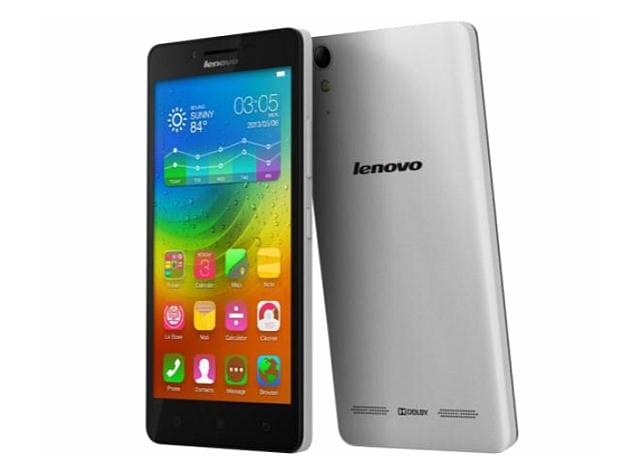 Lenovo
A6000 is the country's cheapest 4G LTE-capable device at this time. The
phone also packs in a lot of features, giving competition to the likes
of the Xiaomi Redmi 1S and Asus ZenFone 4. We used the phone for more
than a week to find out if it's a good buy...
Build & design
Lenovo A6000 doesn't look very different from other Android smartphones available at this price. It essentially sports the same rectangular form factor combined with rounded corners and a plastic shell, which we've seen in phones such as the Redmi 1S.
If you want your phone to stand out from the rest of the crowd, you can swap the phone's black back panel and choose a red or white one. The back panels will be available separately. Other than that, the phone has a very utilitarian design.
The phone is pleasantly lightweight which makes it easy to lug around.
The front of the phone is dominated by a 5-inch HD screen.The three capacitive touch navigation buttons are placed right below the display and were pretty responsive. Unfortunately, the keys are not backlit.
A 2MP front-facing camera is placed right above the display next to the earpiece.
The right edge of the phone houses the volume rocker and power keys. Both of the keys offer good tactile feedback and were responsive. The left and bottom edges are barren while the top sports the 3.5mm headset jack as well as the micro-USB port.

The back cover wraps around the front panel and hides the 2300mAh battery (removable), two micro sim card slots and a microSD card slot. The back panel sports a matte finish and offers a good grip. The 8MP camera lens and LED flash are placed towards the upper portion of the back.
Kudos to Lenovo for not being stingy and including accessories such as earphones, charger and even a screen protector in the box.
Display
The phone features a 5-inch IPS HD (720x1920p) display which offers good viewing angles and vibrant colours. Sunlight legibility was also good but the only issue we faced was that the display is prone to smudging.
It doesn't feature Gorilla Glass protection so it's better to use a screen protector (included in the box). The touch was also reasonably responsive.

Software
The A6000 comes with a heavily customized version of Android 4.4 KitKat. Lenovo deploys its own UI skin to offer enhanced features and customization options.
Just like Xiaomi's MiUI and Huawei Honor 6, the phone's default UI is devoid of an app drawer and app icons and widgets are spread across the home screens. The unified home screen-app launcher style may come across as user-friendly to people who have not used an Android phone before. But it will take some time to get used to if you have already been using an Android smartphone. You can of course download and install an alternate launcher.
The phone also comes with two themes each of which comes with a different set of icons, wallpapers, font style, sounds, and lock screen styles. There's no way to download or install new themes but existing ones can be customized.
The software does not include any stock Android app and everything including the Gallery, Calculator, Calendar and Email apps are built by Lenovo's software team. The apps look beautiful and offer additional value added features.
Lenovo bundles a large number of apps with the A6000 including a Security app, its SyncIt, CloneIt and ShareIt apps, Guvera music streaming app, Route 66 navigation, WPS Office, UC Browser, Txtr eBooks app and a number of Gameloft games. Thankfully, the third party apps can be uninstalled to free up storage space.
Overall, we feel the software tries to maintain the balance between customization and functionality and has been optimized for the phone's hardware. However, stock Android fans may find it a little intimidating.
Camera
Lenovo A6000 sports an 8MP rear camera (with auto focus and LED flash) and a 2MP front facing camera.
The phone features Lenovo's own camera app that offers settings for all optical attributes, HDR (including auto-HDR), Panorama and Timer modes, among others.

Images captured by the camera in day light turned out well with decent level of detail, accurate colour reproduction and good contrast. Images shot in low-light were grainy but comparatively better than other phones available in the same segment.
The front camera is also good for clicking selfies and for video calls.

The phone is capable of shooting 720p video (in addition to 480p, WVGA, VGA, CIF, QVGA and QCIF) and the results were good for a phone that costs less than Rs 8,000. Overall, the A6000 comes with a capable camera which is only slightly inferior to that offered by the Xiaomi Redmi 1S.
Performance
Lenovo A6000 is powered by a 64-bit 1.2GHz Qualcomm Snapdragon 410 processor and 1GB RAM, the phone comes with 8GB of storage space (about 5GB is available to the user) but you can also use microSD cards up to 32GB to expand storage. We were not able to use USB On-the-Go drives with the phone though.
The dual sim phone supports 4G LTE connectivity with support for both FDD 1800MHz (Band 3) and TDD 2300MHz (Band 40) in addition to other popular connectivity options including Bluetooth 4.0 and 3G.
While we were not able to test 4G capabilities of the device due to the absence of a 4G network in the city, we were satisfied with the responsiveness of the phone's user interface.
We did not experience any major lag while navigating through the home screen and menus although at times there was minor stutter while launching apps and switching between them. Scrolling was smooth and the phone was able to play full HD video files. We were able to play most popular video and audio file formats barring a few like .MKV.

In synthetic benchmarks, the phone scored in 20,334 in Antutu,11,504 in Quadrant and 53.9 in Nenamark 2 benchmark tests. The scores are slightly better (barring Nenmark 2) than the ones clocked by Xiaomi Redmi 1S. However, we do not recommend a phone based solely on benchmarks as real world performance is different at times.
Lenovo A6000 offers good call quality and signal reception and we did not encounter issues while making calls even in areas where cell signal is relatively weaker.
It's worth pointing out that the phone's second sim card slot does not support 3G or 4G data connectivity.
The phone was able to lock to GPS without any hiccups. It also offers FM radio.
The external Dolby twin speakers also have loud sound output that offers clarity even at higher levels. You can choose among four preset settings modes or customize the equalizer settings via the Dolby app. However, the speaker outlet is located at the back and unfortunately, the sound gets muffled when the phone lies at its back.
Lenovo A6000 packs a 2,300mAh battery (removable) and will last you a full working day (14-15 hours) if you put the screen brightness at the highest level and use 3G data all the time. You'll be able to make about 1-2 hours of phone calls, play some casual games and browse the web in this time period. It lasted more than 20 hours with light to medium usage.
Your mileage may vary with different usage patterns.
We feel that the phone performs pretty well keeping in consideration that it's a budget device.
Gaming
We were able to play games like Temple Run 2, and Looney Tunes Dash without encountering frame drops or freezes. We were also able to play Asphalt 8 (with visual settings set to 100%) encountering very minor lag. The phone did not get warm even when we played the game for longer durations.
Verdict
At Rs 6,999, the Lenovo A6000 offers an excellent features to price ratio. Although not as feature-rich as the Xiaomi Redmi 1S (which offers full-HD recording, better camera), the phone is the only device that features 4G connectivity in this price range. Also bear in mind that the Redmi 1S is no longer available.

Even if you don't have access to 4G networks (most parts of the country don't) or don't intend to use the high-speed data network, Lenovo A6000 is still a well rounded budget smartphone.
Just like the Redmi 1S, Lenovo A6000 is sold in limited numbers through weekly flash sales on Flipkart. So you'll need to register and play fastest fingers first on sale day if you want to get your hands on the phone. BUY ON FLIPKART:

We’ve been hearing rumors for a while now about WhatsApp launching voice calling on its Android app. The feature is indeed available in the app’s latest version, but you’ll need another user’s help to activate it.
First, you’ll first need the latest version of the Android app, which, at the time of writing is 2.11.561. Then you’ll have to ask a user who has the feature to call you.
Once you’ve received the call, close the app and reopen it. You should now see a new screen with three columns, including one for calls.

You can then call any of your WhatsApp contacts over VoIP through the app. You may not be able to reach people running older versions of the app.
It’s certainly not the most efficient way of rolling out a feature, but that may be the point. There’s no word yet on whether the company will charge for calls in the future.
We’ve contacted WhatsApp to find out more and will update this post when we hear back.

Which is safest: Android, iOS or Windows Phone?
How important is security in a mobile operating system?
Very. Try to imagine any of these situations, the stress they can cause and the money you could lose:
- Your phone gets stolen or you lose it in the back of a cab.
- Someone steals your photos.
- A virus sneaks into your phone and steals your payment information.
- Your phone gets damaged and you haven't backed it up.
When a mobile operating system is secure and its security features are easy to use, it's less likely you will end up in one the situations. Choosing a more secure mobile operating system could save yourself a lot of hassle in the future.
What mobile operating systems are we comparing
Over 95% of mobile phones that are able to connect to internet use Android, iOS, or Windows Phone. We have analyzed the following versions found on typical devices:- Android 4.4.4 (KitKat) on Nexus 4 - iOS 8 on iPhone 5s - Windows Phone 8.1 (Update 1) on Lumia 630
Although Windows Phone is still has a long way to go before it catches up to Android, its market share is approaching 3.6% in the United States; which is why we decided to include it in our comparison.
Which operating system has the fewest amount of viruses and harmful apps?
Alcatel-Lucent reported that 60% of mobile malware infections happened on Android. As the most widely used OS in the world, it's also a prime target for hackers. Viruses don't attack Android from Google Play, which is safe, but through pirate app stores or direct app downloads.Malware like Android Defender, a false app that hijacks your smartphone, haven't been seen on either iOS or Windows Phone for one very simple reason: Android is the only system that lets you install apps outside of its official app store. By default, you can't install apps from unknown sources, but people who want free apps are willing to bypass security to save money.
Below is an example permissions required by an official game and the malware infested copy.

The green border shows the official game; the red shows the game with a virus that asks for more permissions (Source: F-Secure)
Apple has tight control over its App Store and makes it difficult for
viruses and misleading apps to sneak onto your iOS device unless you've
jailbroken your phone, something most users don't do. Windows Phone is
in a similar situation, although its store is full of fake apps that
Microsoft is only now cleaning up.iOS wins for its quality control and app security
Which is easier to recover if my phone gets lost or stolen?
All three systems have anti-theft apps: Find my iPhone, Android Device Manager, and My Windows Phone. These apps allow you to locate your device remotely and send basic commands, such as erasing your data or setting off an alarm. However, Windows Phone is the only system that can send these commands via SMS, Wi-Fi and cellular data.
The anti-theft apps for Android, iOS, and Windows Phone
iOS features an activation lock, which requires you
to enter your Apple account information if a phone is reported as lost.
This feature has effectively helped decrease iPhone thefts. However, Microsoft is working on adding an activation lock to Windows Phone.
Android allows you to lock the phone with a message and a phone number
Android has a password lock similar to Apple, with the option to add a
phone number to your lock screen just in case someone finds the device.
You can also lock or wipe your friends' devices (also possible on iOS). Samsung phones have additional options, but only on certain models.What happens if someone steals your phone and wants to access your data? In this case, only iOS 8 incorporates full data encryption by default. Android features an optional setting and on Windows Phone, data encryption doesn't apply to the memory card. This means that iOS is the only system that offers complete data protection in case of loss or theft.
iOS 8 takes the lead with its automatic data encryption.
Which is the easiest to unlock and which has the best device lock?
According to a 2013 report from Trend-Micro, between 30% and 60% of users don't lock their cell phone. Having to unlock your phone is often seen as a nuisance. Therefore, the ideal locking system should meet two main requirements: it must be unbreakable and easy to use.Android has the largest variety of locking options: slide, PIN, password, pattern, and facial recognition. The pattern is perhaps the easiest to use and is also extremely secure. iOS, on the other hand, has PIN and password protection as well as Touch ID on newer iPhones. Windows Phone only offers swipe and password.

Apple's Touch ID in action (photo courtesy of iPhoneWorld)
In my opinion, Touch ID is most convenient system.
It's difficult to break into and unlocking takes a second. The runner up
is Android's pattern lock, which although robust, is less reliable than
the fingerprint, especially if you set an easy pattern.iOS wins for its Touch ID.
Which best protects my children?
Parental control has long been a long-standing issue for mobile operating systems. What worries parents most today are the things their children are able to do with their smartphone or tablet, such as buying expensive apps without permission or accessing important data and photos.Android has parental controls with its user profiles, but those are only available on tablets. Android's app store, Google Play , allows you to set a password to make purchases. Windows Phone has more options, such as My Family which allows you to define what kind of apps your children can download and how much they cost. It mainly focuses on controlling the installation of apps, and is configured from the browser.

My Family (Windows Phone) allows you to control the purchasing and installation of apps
iOS 8 is the one with the most options. In the Restrictions menu you can disable system apps (like the browser) and limit the settings that can be changed. With Family Sharing you're able to control purchases (children must request permission to buy apps). The most useful feature however is Find My Friends, which allows you to locate your friends and family on a map.
With Find My Friends (iOS) you can locate family and friends on the map
If I had to choose an OS for the quality of parental
controls, the mere simple fact that i can locate my family makes iOS my
clear choice. In iOS 8, Apple's operating system is designed to help
families who want to keep their kids safe.iOS 8 is the winner with its parental controls and Find My Friends.
Which one best protects my data if it gets erased?
After resetting or switching phones, what features can you restore? Has the system backed up your data and apps? Backing up data to the cloud is one aspect to keep in mind when opting for one system or another.Windows Phone can back up your apps, photos, and text messages to the cloud. You have 18 gigabytes of free space available to use with Microsoft OneDrive. Windows Phone saves you the hassle of remembering to make regular backups. Your backups can be also managed (deleted) from the phone.

The cloud backup system for Windows Phone uses OneDrive
Android uses a different approach. It automatically
stores your settings and passwords in the cloud, but photos, videos and
documents are stored in separate, optional spaces such as Google Drive or Google+ for a combined 15GB of storage.iOS stores all kinds of data in iCloud, but only gives you five gigabytes for free. This is virtually nothing compared to the 18 gigabytes that Microsoft provides through OneDrive (15GB free and 3GB for uploading your photos).
Windows Phone wins for its extra space and easy configuration.
Conclusion: iOS is the safest out of the box
Second place goes to Windows Phone: very robust and with excellent backup options, but still needs some work.
Android falls to third place, as it forces you to make more decisions and has a less consistent security landscape, with manufacturers adding their own security customizations.As we discussed in the previous comparison, security that isn't intuitive is not very useful. iOS 8 takes first place because Apple knows how to combine safety with ease of use. It requires little configuration, and features such as Touch ID and Find My Friends make it unbeatable.
In short: if you don't want to think too much about security, choose iOS or Windows Phone. Android can be dangerous, but only if you're leaving Google Play and customizing your security settings to leave the phone open. I guess that's just the price you pay for more freedom.

Asus
has confirmed on its official forum that six of its devices (and their
variants) will be receiving an update to Android 5.0 Lollipop next year.The list of devices scheduled to receive the Android 5.0 Lollipop includes the popular Asus ZenFone series of smartphones - ZenFone 4, ZenFone 5, and ZenFone 6 - alongside Padfone S and Padfone Infinity (second gen).
According to the official listing (via a Taiwanese publication), the ZenFone 4 (A400CG/ A450CG), ZenFone 5 (A500CG/ A501CG), ZenFone 5 LTE (A500KL), ZenFone 6 (A600CG/ A601CG), and PadFone S (PF500KL) will be receiving the Android 5.0 Lollipop update starting April 2015. The refreshed Asus Padfone Infinity (A86), on the other hand, will receive the update in June.
 Asus, starting early October, rolled out the Android 4.4 KitKat OS update for the ZenFone 4 A400CG, ZenFone 5 (A501CG) and ZenFone 6 (A601CG) handsets worldwide.
Notably, Google, Motorola, Sony, HTC and LG have already revealed the list of devices expected to receive the Android 5.0 Lollipop update. Meanwhile, Samsung has hinted about few high-end smartphoneslikely to receive the update.
Some of the notable features of the Android 5.0 Lollipop version include a cleaner, flatter design with a more fluid interface and animations. There is a new 'Quick settings' menu that has been revamped, and includes new controls like flashlight, hotspot, cast screen controls and more. The lock screen now displays richer notifications, and users can view and respond to messages directly from the lock screen.
Android 5.0 Lollipop also comes with an opt-in kill switch dubbed 'Factory Reset Protection', which will allow users to wipe out the device's data on will. There is the new Messenger app; a guest user mode with custom options for access; and screen pinning that lets users fix in place the screen that's displayed without allowing guests to go further. Google has also added a new battery saver feature to Android 5.0 Lollipop, claiming to extend device battery life by up to 90 minutes.
According to the official listing (via a Taiwanese publication), the ZenFone 4 (A400CG/ A450CG), ZenFone 5 (A500CG/ A501CG), ZenFone 5 LTE (A500KL), ZenFone 6 (A600CG/ A601CG), and PadFone S (PF500KL) will be receiving the Android 5.0 Lollipop update starting April 2015. The refreshed Asus Padfone Infinity (A86), on the other hand, will receive the update in June.
Asus, starting early October, rolled out the Android 4.4 KitKat OS update for the ZenFone 4 A400CG, ZenFone 5 (A501CG) and ZenFone 6 (A601CG) handsets worldwide.Notably, Google, Motorola, Sony, HTC and LG have already revealed the list of devices expected to receive the Android 5.0 Lollipop update. Meanwhile, Samsung has hinted about few high-end smartphoneslikely to receive the update.
Some of the notable features of the Android 5.0 Lollipop version include a cleaner, flatter design with a more fluid interface and animations. There is a new 'Quick settings' menu that has been revamped, and includes new controls like flashlight, hotspot, cast screen controls and more. The lock screen now displays richer notifications, and users can view and respond to messages directly from the lock screen.
Android 5.0 Lollipop also comes with an opt-in kill switch dubbed 'Factory Reset Protection', which will allow users to wipe out the device's data on will. There is the new Messenger app; a guest user mode with custom options for access; and screen pinning that lets users fix in place the screen that's displayed without allowing guests to go further. Google has also added a new battery saver feature to Android 5.0 Lollipop, claiming to extend device battery life by up to 90 minutes.

Motorola Moto E clients are at the edge of getting the most recent Android 5.0.2 Lollipop on their most loved low plan gadget. Moto E is truly a test for some little to medium cell phone producers in India and it has been the best cell phone close to the $100 mark. Motorola had taken a great activity in dispatching the Moto E a year ago trying to acquire quality cell phones after their release of Moto E. Motorola is still ahead in providing Lollipop for your device now also.
Motorola
had released their Lollipop Soak test for Moto E and this is happy news
to all the Android users in India cause it was long waited update for
them. Motorola’s soak update was given for test only to some users who
had registered for it. But we are helpful to give this access to all
Moto E users.
 Image credits: Rohitagni
In case you cant wait get the Lollipop upgrade at this time, get ready cause we are gonna introduce you to introduce the spilled splash test OTA ZIP file on your Moto E [Indian variant only]. In any case, you need to restore over to stock non-established Moto E before progressing with the establishment.
Also Read: Lollipop update for Xiaomi Redmi 1S, MI 3, Note and MI 4 is on the way
Install Android 5.0.2 Lollipop OTA Zip on Moto E
1. Download the soak test Lollipop OTA zip file → Download | Mirror2. Make sure you have the latest Motorola Update services app installed on your device. You can download the latest version of the app from the Playstore link below: Motorola Update Services
3. Connect your Moto E to the PC and transfer the downloaded zip file to the root of your internal storage and Sd Card. Make sure you have changed the file name to Version 22.21.32. 4. Reboot the device.
5. Navigate to Settings > About Phone > System Updates and select “Yes. I’m in” to install the OTA file on your device. If the update was not not popped up, press check for update button.
7. Sit back and relax while the OTA zip is installed on your device.
That’s it. The update might take some time as the device is updated to a new version, so sit tight until the process is finished.
NOTE : Your Phone is completely safe after Upgrading to Lollipop 5.0.2. You will get Future updates and also your phone will not get rooted after this. I am telling you just because there were rumors on this.I have asked Motorola Help and they replied this. Check for the proof below. Do share this so that others could also see it.!

Here are a few screenshots of the Lollipop running on Moto E:

If you liked this post, please take a minute and SHARE it! Help us go viral, and reach this news many more fans! Got anything to add to the story or got any doubt/question, please feel free to comment. I would love to hear more from you!

DEAR XDA FRIENDS! I INTRODUCE TO YOU THE FAMOUS CM11 IMER'S AND UKRANIAN CM DEVELOPERS BUILD!
DUE TO IMER CAN'T CREATE A THREAD HERE IN XDA, I WILL DO. ALL CREDITS GO TO HIM AND WHOEVER HELPED HIM!
Code:
*
* Your warranty is now void.
*
* You flash this at your own risk.
* Everytime make a backup before you flash anything new.
* You take responsibility for anything happens to your device,
* there is no one to blame if you lose contacts, data or don't
* follow instructions exactly.
* Avoid questions that have been answered in thread or in OP.
* First search then ask.
Instructions and Download links:
For new install:
- Download CM11 (CM11 Download)[P700&P705]
- Download Gapps (http://forum.xda-developers.com/show....php?t=2397942)
- Reboot Recovery
- Wipe data / Factory reset
- Format /system
- Install ROM
- Install Gapps
- Wipe Cache / Dalvik Cache
- Reboot
For updates:
- Download CM11 (links above)
- Download Gapps (links above)
- Reboot Recovery
- Wipe cache / Dalvik Cache
- Format /system
- Install ROM
- Install Gapps
- Wipe Cache / Dalvik Cache
- Reboot
<< CWM 6.0.4.9 is attached at the end of the OP >>
#ATTENTION!!!#
On 20140912 build you need to flash with CWM 6.0.4.9 or else you'll face status abort, error 7...
Basebands:
# By Szymel00 #
Experiment with different baseband to see which suits your device best. BACKUP FIRST!
DON'T MIRROR DOWNLOAD LINKS
SELECT CORRECT VERSION - IF YOU HAVE P705, SELECT P705 BUILD
DON'T SWITCH TO ART, NOT TESTED / COMPATIBLE YET
FIRST BOOT COULD BE LONG! WAIT!
SCREENSHOTS:


What's working:
Everything!
(Well except FM Radio but we can always hope!!!
 )
Sources:
https://github.com/CyanogenMod/
https://github.com/TeamHackLG
https://github.com/imercm
http://review.cyanogenmod.org
If you want the developer to update and maintain his original site consider Donate to him.